

Inspect Core in Solera Service Suite gives Ford dealers a streamlined way to capture findings, attach photos and video, and move recommendations toward advisor review and customer authorization, without waiting for a full MPI form build. Day-one capture on the same core screens as full Inspect. Everything the other guys left out.
Observations, recommendations, severity, media, and customer messaging in one workspace. This is what an inspection tool looks like when it was designed to live on your operating platform, not bolt on to it.
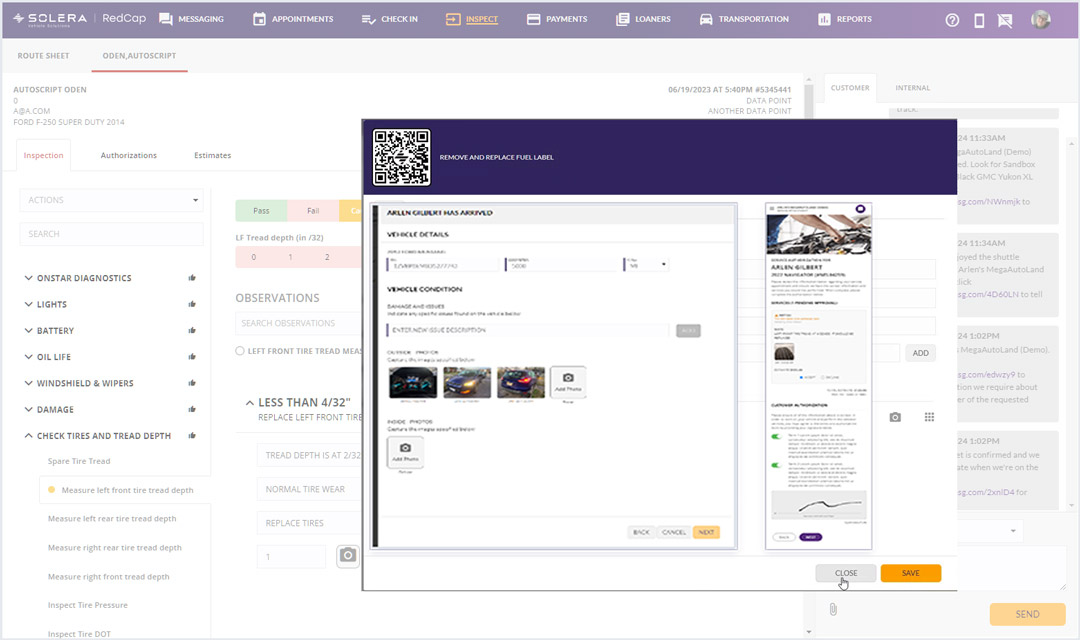
Inspect Core uses the built-in Custom workflow when a full MPI form is not yet configured. New and Lite dealers start capturing from day one.
Document what the technician sees without forcing the finding into a heavy checklist. Capture observation, cause, notes, and severity as the vehicle is still in the lane.
Scan the QR code to the mobile technician screen, capture photo or video, and it appears on the advisor dashboard immediately.
Present media-backed recommendations to the customer's phone. Approvals write straight back to the RO so the work can advance.
Recommendations get lost between what the technician sees in the bay and what the advisor can present at the counter. Setup stalls capture. Express and quick-lane volume moves too fast for heavy inspection forms. Verbal hand-offs leak revenue, because a recommendation passed by word of mouth rarely reaches the advisor with photo, cause, and severity attached. Without media on the dashboard, the advisor cannot mature a credible estimate quickly. That is the gap Inspect Core closes on day one.
Inspect Core is the ad hoc inspection and recommendation workflow inside Solera Service Suite. It uses the built-in Custom form when no MPI forms are configured, giving the lane day-one capture on the same core screens as full Inspect.
Use the built-in Custom workflow when a complete MPI form is not yet configured. New and Lite dealers default into Inspect Core and start capturing recommendations from day one.
Document what the technician sees without forcing the finding into a heavy checklist. Capture observation, cause, notes, and severity as the vehicle is in the lane.
Attach photos and video to every finding. Scan the QR code to the mobile technician screen, capture media, and it appears on the dashboard immediately.
The advisor reviews the finding on the dashboard, sees the media the technician captured, and matures the estimate with cause, severity, and notes. No retyping, no phone calls back to the bay.
Present the recommendation with media backing and let the customer approve on their mobile authorization screen. Approvals write straight back to the RO so the work can advance.
Inspect Core and full Inspect run on the same core screens. Moving from Core to a configured MPI in full Inspect is a natural next step, not a re-learn.
The difference is not a longer feature list. It is whether a finding actually reaches the advisor with the media that makes it credible. Line them up and the gap is impossible to miss.
Document a finding the moment you see it. Capture photos and video from the mobile screen. No waiting on a form build to start recording work, so findings never live in someone's head.
See media on the dashboard the instant it is captured. Review and finalize the estimate with cause, severity, and notes. Present recommendations customers can authorize with a single tap.
Stand up day-one capture across the lane. Use the Custom form as a fast lane for express work. Same core screens make the move to full Inspect easier when the process is ready.

A standalone video inspection tool can only ever fix one moment. Inspect Core is a practical starting point inside Solera Service Suite, and Service Suite is one card on the Solera Cloud OS, the intelligent operating system that connects every dealership workflow on one shared data layer. The customer created in your CRM is the same customer on the service drive. No re-entry, no re-keying, no starting over.
Ad hoc recommendation capture with media, on the same core screens as full Inspect.
The cloud-native operational core that runs the dealership.
Appointments, transportation, check-in, payment, and delivery, connected.
The command center for engagement and follow-up.
Lifecycle campaigns and a conversion-focused storefront.
Connected vehicle protection that extends past delivery.
Inspect Core is the fast on-ramp inside the broader Service Suite journey. Start lightweight, then expand into the connected fixed-ops platform when the dealer is ready.
One customer record. Every product reads from and writes to the same data layer. Inspect Core turns quick service findings into documented, media-backed recommendations, connected to the rest of your operation.
The infrastructure and data layer accelerating the Cloud OS.
A bolt-on tool cannot get smarter, because it has nothing to learn from. Inspect Core sits on top of connected lifecycle signals, so the recommendation captured in the lane becomes shared, connected data the whole store can act on. Real progress comes from applying AI where the work happens, powered by connected context, not from another standalone widget your team has to learn.
Inspect Core lives in Solera Service Suite and writes to the same customer record as every Solera product on the Solera Cloud OS. The Solera AI Engine sits on those connected lifecycle signals, so the recommendation captured in the lane becomes shared, connected data the whole store can act on. Start with the inspection moment. Grow into the connected fixed-ops platform when your team is ready.
Schedule a live demo